
1) 파일 유형 식별

사용법 : file <filename>
PE32 : 32비트 실행 파일
PE32+ : 64비트 실행 파일

import magic
m = magic.open(magic.MAGIC_NONE)
m.load()
ftype = m.file(r'sample32.exe')
print(ftype)
파이썬으로 magic 모듈을 이용한 파일 유형 식별
2) 파일 해시 계산


사용법 : md5sum <filename> , sha256sum <filename> , sha1sum <filename>
* 와일드카드로 전체 스캔 가능
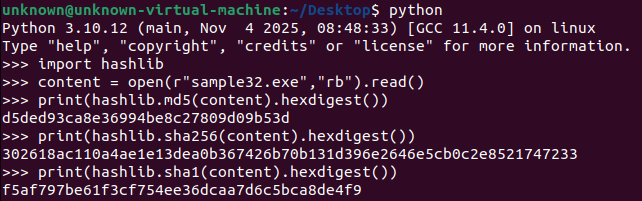
import hashlib
content = open(r"sample32.exe","rb").read()
print(hashlib.md5(content).hexdigest())
print(hashlib.sha256(content).hexdigest())
print(hashlib.sha1(content).hexdigest())
파이썬으로 hashlib 모듈을 이용한 파일 해시 추출
3) 파일 문자열 추출
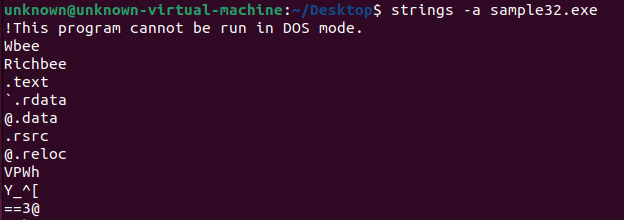

사용법 : strings <option> <filename>
최소 4문자 이상인 ASCII 문자열을 추출한다.
strings -a : 전체 파일에서 문자열 추출
strings -el : 유니코드 문자열 추출
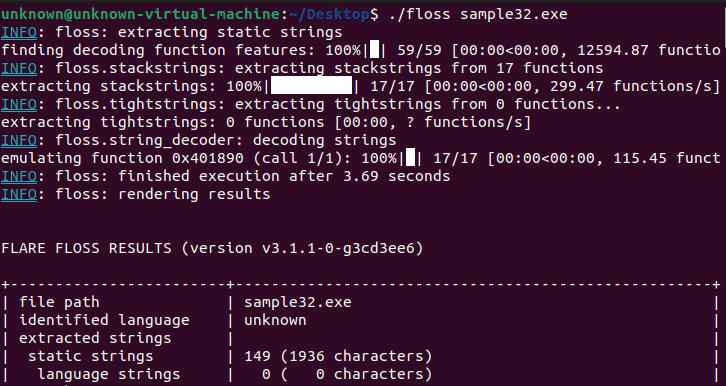
사용법 : floss <filename>
난독화된 문자열을 자동으로 식별하고 추출하는 도구
4) 퍼지 해시 (파일 유사도 비교)
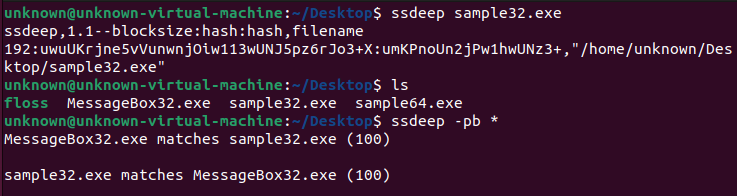
사용법 : ssdeep [-m file] [-k file] [-dpgvrsblcxa] [-t val] [-h|-V] [FILES]
퍼지 해싱 도구, 파일 유사도를 비교하는 데 사용됨 ,
동일한 악성코드군 또는 동일한 공격자 그룹에 속하는 샘플을 식별하는데 도움 됨
-p (상세 일치 모드) , -r (재귀 모드)
-m - FILES를 파일의 알려진 해시와 일치시킵니다.
-k - FILES의 서명을 파일의 서명과 일치시킵니다.
-d - 디렉터리 모드, 디렉터리의 모든 파일을 비교합니다.
-p - 일반 일치 모드. -d와 유사하지만 모든 일치 항목을 포함합니다.
-g - 일치 항목을 클러스터링 합니다.
-v - 자세한 모드. 처리 중인 파일 이름을 표시합니다.
-r - 재귀 모드
-s - 자동 모드. 모든 오류는 표시되지 않습니다.
-b - 파일의 이름만 사용하고 모든 경로 정보는 생략합니다.
-l - 파일 이름에 상대 경로를 사용합니다.
-c - CSV 형식으로 출력을 출력합니다.
-x - FILES를 서명 파일로 비교합니다.
-a - 점수에 관계없이 모든 일치 항목을 표시합니다.
-t - 지정된 임계값을 초과하는 일치 항목만 표시합니다.
-h - 이 도움말 메시지를 표시합니다.
-V - 버전 번호를 표시하고 종료합니다.
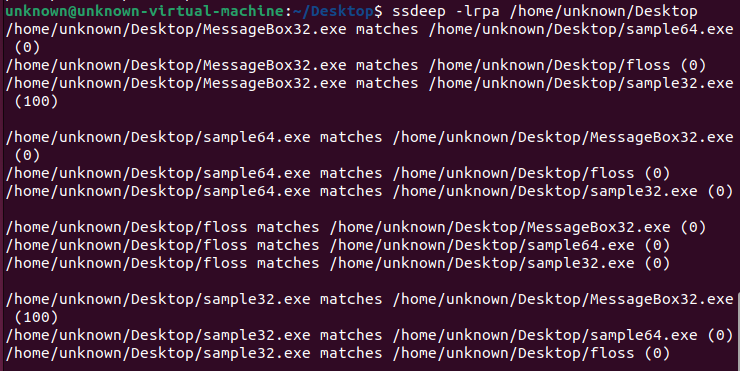
-r 옵션으로 샘플을 포함된 하위 디렉터리에서 ssdeep 실행 가능

응용하여 새 파일과 이전 분석한 샘플의 해시를 비교할 수 있음

import ssdeep
hash1 = ssdeep.hash_from_file('sample32.exe')
print (hash1)
hash2 = ssdeep.hash_from_file('MessageBox32.exe')
ssdeep.compare(hash1,hash2)
파이썬으로 ssdeep 모듈을 이용한 유사성 비교
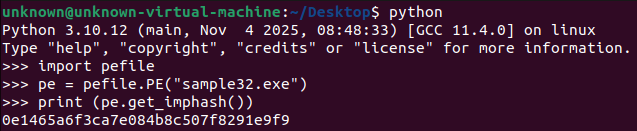
import pefile
pe = pefile.PE("sample32.exe")
print (pe.get_imphash())
파이썬으로 pefile 모듈을 이용한 imphash 추출
imphash : (라이브러리/임포트 함수(API 명) 특유의 순서를 바탕으로 해시 값을 계산
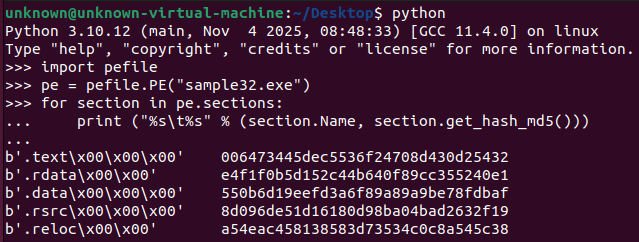
import pefile
pe = pefile.PE("sample32.exe")
for section in pe.sections:
	print ("%s\t%s" % (section.Name, section.get_hash_md5()))
파이썬으로 pefile 모듈을 이용한 sectionhash 추출
5) 바이러스 토탈 조회
import requests
import sys

API_KEY = "<API_KEY>"

def check_virustotal(file_hash):
    url = f"https://www.virustotal.com/api/v3/files/{file_hash}"
    headers = {
        "accept": "application/json",
        "x-apikey": API_KEY
    }

    response = requests.get(url, headers=headers)

    # Sample not found
    if response.status_code == 404:
        print("[!] The sample does not exist on VirusTotal.")
        return

    data = response.json()

    try:
        stats = data["data"]["attributes"]["last_analysis_stats"]
        results = data["data"]["attributes"]["last_analysis_results"]

        print("\n===== Detection Summary =====")
        print(f"Malicious: {stats['malicious']}")
        print(f"Suspicious: {stats['suspicious']}")
        print(f"Undetected: {stats['undetected']}")
        print("=============================\n")

        print("===== Engine Detection Details =====")
        for engine, result in results.items():
            category = result.get("category", "unknown")
            if category != "undetected":
                print(f"{engine}: {category} ({result.get('result', 'N/A')})")
    except KeyError:
        print("[!] No analysis data is available.")


if __name__ == "__main__":
    if len(sys.argv) != 2:
        print(f"usage: python {sys.argv[0]} <file_hash>")
        sys.exit(1)

    file_hash = sys.argv[1]
    check_virustotal(file_hash)
자주 사용하는 리눅스 명령어 정리
| OS 정보 확인 | uname -a > 커널/OS 정보 cat /etc/os-release > 환경 확인 dpkg -l / rpm -qa > 설치 패키지 확인 env / printenv > 환경 변수 확인 |
| 파일 바이트 단위 비교 | cmp -l file1 file2 윈도우) fc /b file1 file2 |
| 파일 찾기 | find /home/unknown/ -name backdoor > unknown 디렉토리에서 backdoor 이라는 파일 명을 가진 파일 찾기 find ~ backdoor.c > 사용자 홈 디렉터리(~) 내에서 파일 검색 |
| 폴더 용량 확인 | du -sh * > 큰 파일 탐지, 데이터 탈취 흔적 |
| 디렉터리 구조 트리 출력 | tree |
| 보호기법 검사 | ./checksec.sh --file file1 |
| 내용 실시간 표시 | tail -f file1 |
| 시스템 로그 | dmesg > 커널 메세지 journalctl -xe > 시스템 로그 |
| 텍스트 비교 | diff file1 file2 |
| 해시 | sha256sum file1 md5sum file1 |
| 문자열 | strings -a file1 |
| 파일 포맷 | file file1 |
| 헥스 덤프 | hexdump -C file1 > file을 hex 덤프+ ASCII로 출력 xxd file | less > file을 hex 덤프로 출력 xxd -r hex.txt > original.bin > hex 덤프(hex.txt)를 다시 원래 바이너리로 복원 |
| 실행파일 분석 | objdump -d file1 > ELF/PE 실행 파일 디스어셈블 objdump -h file1 > 섹션 확인 readelf -a file1 > elf 구조 |
| 테이블 확인 | nm file1 > 심볼 테이블 ldd file1 > 의존 라이브러리 |
| 패킹/난독화 탐지 | binwalk file1 > 압축/내장 파일 탐지 upx -d file1 > upx 언패킹 |
| 동적/백그라운드 | strace ./file1 > 시스템 콜 추척 ltrace ./file1 > 라이브러리 호출 추적 jobs > 백그라운드 프로세스 확인 |
| 프로세스/네트워크 | ps aux > 프로세스 확인 ps -ef > 프로세스 확인 pmap > 프로세스 메모리 맵 top / htop > 실시간 CPU/메모리 사용 netstat -anp > 네트워크 연결 확인 ss -nltp / -nltu > 리스닝 포트 출력 ss -antp > 연결된 세션 출력 |
| HTTP 요청 | curl -v <URL> 요청 테스트 wget <URL> 파일 다운로드 dig <Domain> DNS 정보 조회 nslookup <Domain> DNS 확인 |
| 네트워크 캡처 | tcpdump -i eth0 > 패킷 캡처 |
| 권한/이상행위 확인 | chmod +x file1 > 파일에 실행 권한 추가 stat file1 > 메타데이터 분석 |
자주 사용하는 윈도우 명령어 정리
| 파일/디렉터리 탐색 | dir > 현재 디렉터리 파일/폴더 목록 tree /f > 디렉터리 트리 attrib > 파일 속성 확인 icacls <파일> > 파일 권한 확인 fsutil > 파일 시스템 정보 확인 comp <파일1> <파일2> 파일 비교 |
| 프로세스 및 메모리 | tasklist > 실행 중 프로세스 확인 tasklist /svc > 서비스 포함 프로세스 확인 taskkill /PID <PID> 프로세스 종료 wmic process list full > 프로세스 상세 정보 |
| 네트워크 | netstat -ano > 포트별 프로세스 연결 확인 netsh advfirewall show allprofiles > 방화벽 설정 확인 ipconfig /all > 네트워크 인터페이스 정보 확인 ping <IP> 연결 테스트 tracert <IP> 경로 추적 nslookup <Domain> DNS 확인 |
| 시스템 정보 확인 | set > 환경변수 출력 systeminfo > OS, 패치, 메모리 등 확인 환경 whoami > 현재 사용자 확인 whoami /priv > 현재 권한 세부 확인 wmic os get /format:list > OS 정보 상세 확인 ver > Windows 버전 확인 |
| PowerShell | Get-Process > 프로세스 확인 Get-Service > 서비스 확인 Get-Command > 시스템 명령 확인 Get-Content <파일> 파일 내용 읽기 Invoke-WebRequest > HTTP 요청 Invoke-Expression > 코드 실행 |